
NewOur own Vetryx app
Vetryx for Android
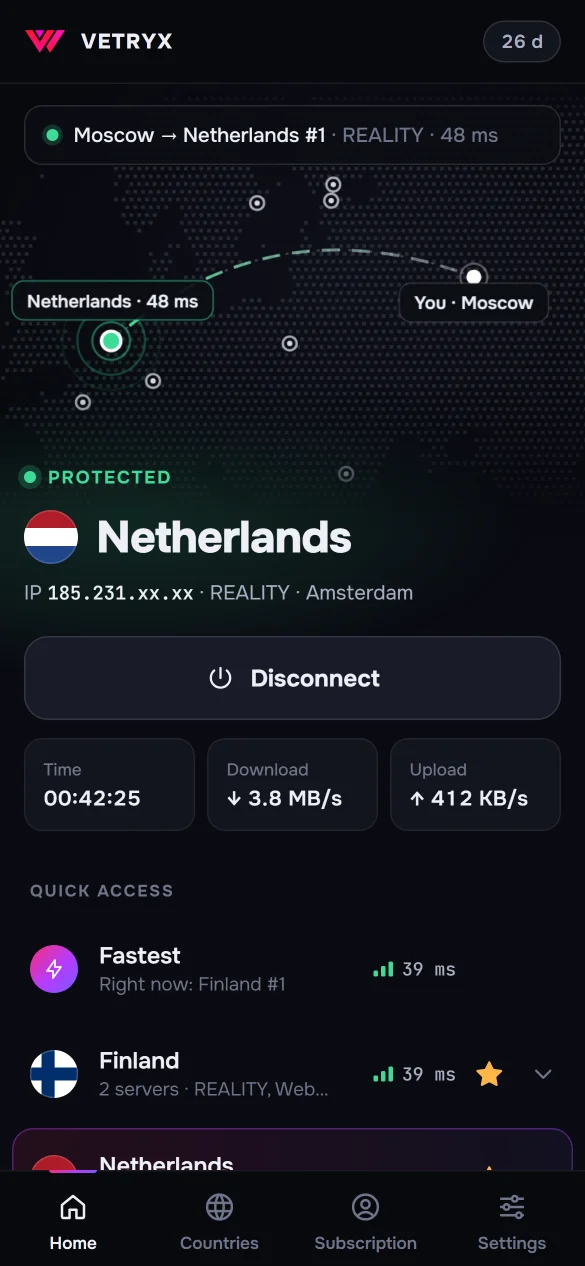
Connect in one tap. The app picks the fastest server for you, switches to another one if a server stops responding, and shows how many days are left on your subscription.
This app is for Android. On iPhone and iPad, connect with Incy — see the setup guide.
Included in every plan No ads English and Russian
Features
Everything you need on one screen
One button
The app measures ping and picks the fastest server. You can also choose a country on the map or in the list.
Built for blocking
Vetryx servers run on protocols built to get past DPI blocking. If a server doesn't connect on your network, pick another one in the list.
Automatic failover
If a server stops responding, the app switches to another one and lets you know with a notification.
Always-on VPN
Turn on “Always-on VPN” in your Android settings, and your phone keeps Vetryx running without letting traffic past it.
Subscription at a glance
The days left on your subscription are right on the main screen, and you get a notification before it runs out.
No ads, no extras
The app is made for Vetryx only: no ads and nothing to configure by hand. The interface is in English and Russian.
Installation
Up and running in two minutes
-
1
Download the file
Open this page on your phone and tap “Download for Android”. If your browser asks whether to keep the file, tap Download anyway.
-
2
Install the app
Open the downloaded file. If Android asks for permission, tap Settings, turn on Allow from this source, go back and tap Install.
Google Play Protect may say the app hasn't been checked. Tap More details, then Install anyway. Android shows this for any app that doesn't come from Google Play.
-
3
Add your subscription
Copy your subscription link in your account or in our Telegram bot, then tap Paste from clipboard in the app.
No subscription yet? Choose a plan — from $4.25 a month.
-
4
Tap “Connect”
The first time you connect, Android asks for permission to set up a VPN — allow it. Done.
The phone takes one slot in your subscription's device limit. You can view and remove devices in your account.
Updates 0.1.0
New versions are posted on this page. Install them over the old one — your subscription and settings are kept.
Requirements
- Android 7 or newer
- A phone or tablet with a 64-bit processor — almost every device since 2017
- A Vetryx subscription — any plan
FAQ
Frequently asked questions
My phone says the file may be harmful. What should I do?
Android shows this warning for any app that doesn't come from Google Play. Tap “Download anyway”, and when installing, tap “More details” and “Install anyway”. Only download the file from vetryx.xyz.
Do I need a separate subscription for my phone?
No. Use the same subscription link as on your computer. The phone takes one slot in your device limit; you can see your devices in your account.
How do I update the app?
Download the new version from this page and install it over the old one: your subscription and settings are kept.
Does the app work on Android TV?
Not yet. On your TV, install Incy or Happ from Google Play and add the same subscription link — see the setup guide.
How can I check the file hasn't been tampered with?
SHA-256 checksum of Vetryx_0.1.0_android.apk:
18E04A073EBC6ABECEB38E335ED5A03904A998566656F0B8685D5774BE9A50C0
The app is signed with our key. Its SHA-256 fingerprint:
94:4B:02:50:2E:EB:C2:5D:53:6B:C0:8B:AE:1E:F7:5D:9D:4C:77:98:CA:5F:0D:28:3B:F8:8E:92:E2:7C:7C:EA
Something not working?
Message us — we'll help you install and connect. A real person from our team replies, not a bot.